Social tournaments
Currently the only coin supported by social tournaments is TON.
Social tournaments can be created by players to compete over a defined period of time for a prize. This type of competitiveness can be used in games where players play solo matches that end with a specific score. When a player completes a match in a social tournament, their score is placed on the tournament's leaderboard. At the end of the tournament, participating players can receieve prizes based on their position in the leaderboard.
Configuration
Several aspects of social tournaments can be custiomized during their creation. Please keep in mind that not all ways of creating a social tournamnet support configuration of all their aspects.
- Name - visible in game's and PlayPad's UI
- Start time - can be used to delay the start of the tournament
- Duration - how long will the tournament last since its start
- Mode:
- Casual - no prize, simply declares the #1 player in the leaderboard the winner at the end
- Competitive - real money at stake through paid entry and a prize pool built from entry fees
- Prize distribution - determines how many players from the top of the leaderboard will receieve a prize at the end, with players who are higher in the leaderboard always receieving a larger prize
- Entry type:
- Pay per play - players buy tickets and then spend one ticket per played match
- Tournament pass - players pay once to enter a tournament and then they can play as many matches as they want, until the tournament ends
- Ticket price - amount of money a player will have to pay to enter the tournament with entry type defining whether that amount is charged once or for each played match
- Creators commission - enabling this setting adds a 10% commission charged from the tournament's prize pool for the creator of the tournament
Creation
Currently there are two different ways in which social tournaments can be created.
Creating in an Elympics Telegram game bot
In games that have an Elympics Telegram game bot created players can create social tournaments directly in that bot.
Sending the /playton command to the bot opens a social tournament creation window.
More advanced social tournament creation window with access to all available options, including creation of scheduled tournaments, can be accessed with the /advanced command.
The /advanced command is only available to to whitelisted Telegram accounts.
If you would like to have your Telegram account added to the whitelist, reach out to us on our Discord server and send us your Telegram account ID, which you can get in the game bot by using the /whoami command.
To get an Elympics Telegram game bot for your game, fill out our submission form.
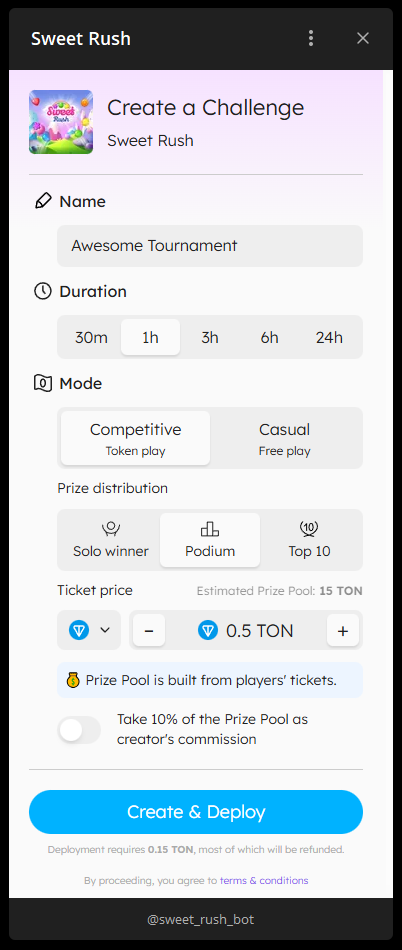
The
/playtonsocial tournament creation window

The
/playtonsocial tournament creation window
Creating via API
To create a tournament using the API, use the Create Tournament endpoint. For competitive tournaments, you must specify a supported blockchain coin. A list of available coins can be found here. Competitive tournaments require a deployed tournament contract to become playable. The deploy transaction must be sent from the wallet of the Elympics user who created the tournament. Upon successful tournament creation, the Create Tournament endpoint will return all the necessary instructions for contract deployment. Detailed guidelines on how to send the transaction can be found here.
Joining
Once a social tournament is created, players can join it to view the current leaderboard status and participate by playing matches.
Joining in an Elympics Telegram game bot
When a social tournament is created in the game's bot, the player will receive a response with a button that will allow them to share a message with an invitation for that tournament.
That message will contain a link in the following format: https://t.me/<BOT_NAME>?start=league-<TOURNAMENT_ID>.
For example, for Sweet Rush it would be https://t.me/sweet_rush_bot/game?startapp=league-<TOURNAMENT_ID>.
Regardless of how the tournament is created, as long as the game has an Elympics Telegram game bot, you can always manually create a link following that pattern and send it to players, so they can join the tournament in Telegram.
Joining in a web browser
If a game is oopened in a web browser with tournamentId query parameter added to the URL it will be opened with a tournament with ID matching the value from that parameter set as the active tournament.
This method can be used regardless of how the tournament was created.
If the tournament was created using an Elympics Telegram game bot, the tournament ID can be copied from the invitation URL generated by the bot.
For example, for Sweet Rush a social tournament link will look like this - https://sweet-rush.elympics.host/?tournamentId=<TOURNAMENT_ID>.
Joining from a game client
PlayPad SDK allows setting the active social tournament in a game by calling the IExternalTournamentCommunicator.SetActiveTournament method, which takes a tournament ID as an argument.
PlayPad SDK does not provide a way to get an ID of a tournament that the local player has not joined.
This means that if you want to use this method for joining new tournaments, you need to either have players manually enter social tournament IDs or set up your own backend and fetch IDs from there.
You can read more about integrating your own backend with Elympics in the external game backend section.
string tournamentId = GetTournamentId(); //This method would get the ID from extranal game backend or from user input
IExternalTournamentCommunicator communicator = PlayPadCommunicator.Instance.TournamentCommunicator;
TournamentInfo tournament = await communicator.SetActiveTournament(tournamentId); //Set the tournament as active and get its details
//Update UI as necessary
To learn more about displaying social tournament leaderboards and starting matches follow the PlayPad SDK integration guide.